LS Pay For Business Central EFT Extension
In this article
LS Pay For Business Central EFT Extension
Intergration
Prerequisites
- LS Pay Service installed and running.
- At least one EFT device set up in the LS Pay Service.
Note: There is a Mock device available for testing purposes which returns pre-programmed responses without connecting to a payment terminal. For most transaction amounts it returns an approved response, however it also has a list of trigger amounts to trigger specific types of responses:
| Amount | Response |
|---|---|
| 103.01 | Authorization Status Declined |
| 103.02 | Authorization Status Cancelled |
| 93.01 | Amount verification |
| 93.02 | Signature verification |
| 101.01-101.10 | Transaction Status Error |
- Business Central version 25 or higher.
- EFT Extension installed on the Business Central instance.
- At least one EFT device set up in the EFT Device List in Business Central.
EFT Extension
The purpose of this extension is to create a connection to the LS Pay Service in AL Code. The main entry point to payments in the EFT Extension is the LSCEFT Payment Entry Point codeunit.
Getting Started
Device handling
A page to create and manage EFT Devices called EFT Device List is included in the EFT Extension.
However, integrators need to design and implement their own method for selecting on which EFT Device a transaction should be performed.
- This is typically be the first step in the integration process. There are various to implement this, here are some examples:
- Create a settings page to select a device from the EFT Device table and saving it to a user, instance or POS profile.
- Create a dialog to select the device from the EFT Device table when initiating a transaction.
Transaction requests
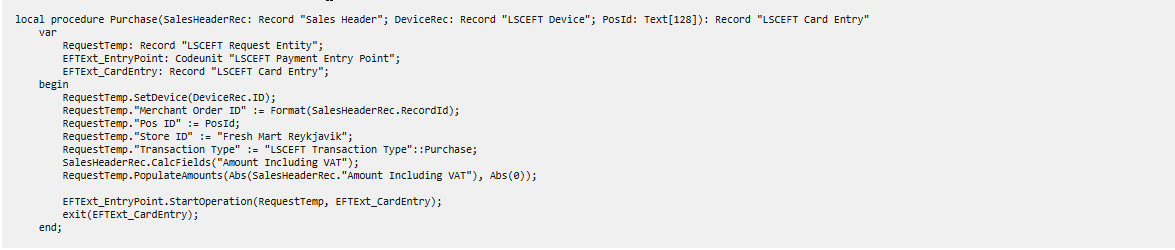
The next step is to write methods for generating the transaction requests. Below is a short example with the minimum data required to perform a payment with most payment providers.
Transaction responses
The final step in the process is to write a method to handle the transaction response.
This includes first checking the Transaction Status to determine whether the transaction successfully completed without errors.
Note: Even if the Transaction Status is Success, the transaction itself still may have been declined. Therefore the next step is checking the authorization status of the transaction to determine whether it was approved or declined, then handling registering the payment based on the authorization status.

Error handling and recovery
If an error occurs during a transaction and no response is received, most payment providers offer the ability to recover the result of the transaction. This feature is unavailable in the current version <current version> of the EFT Extension but will be added in the near future.
Transaction popup dialog
A Javascript popup dialog is automatically shown during an transaction. For many payment providers it shows update messages about the status of a transaction (Examples:
- Processing Request,
- Insert Card
- Enter PIN
- Processing Response
- Transaction Approved
After a transaction is finished, it shows the result (Examples: Approved, Declined, Cancelled, Error).
It will also handle any type of verification that may be required such as signature verification.
Tables
The two most important tables of the EFT Extension is LSCEFT Request Entity (request) and LSCEFT Card Entry (response).
LSCEFT Request Entity
A temporary table containing all the request data needed to initiate a transaction.
Notes:
- The label Conditionally Mandatory refers to that some fields are required for certain payment providers (see LS Pay's payment provider documentation for details), otherwise optional.
- The label Check Feature Flag refers to that some optional fields are not always supported, it is indicated by the feature flag of the plugin whether or not the field is supported.
| Parameter name | Type | Description | Mandatory | Feature Flag |
| ID (Primary Key) | Integer | Auto-increment Id field, no need to set a value. | No, auto-created | |
| Client Transaction ID | Text[256] | A unique ID to identify the transaction. Format requirements differ slightly between payment providers. Interface LSCEFT IClient Transaction ID Handling is used to generate the ID. LSCEFT Trans ID GUID is the default implementation which generates a GUID with special characters removed. To generate other formats of IDs, create a class inheriting the LSCEFT IClient Transaction ID Handling interface and make sure it's selected on the EFT Device profile. | No, auto-created | |
| Device ID | Code[20] | The ID of the EFT Device that should receive the request. Use RequestTemp.SetDevice(DeviceRec.ID) to set the Device ID | Mandatory | |
| Merchant Order ID | Text[128] | ID to link multiple transactions within the same order. | Mandatory | |
| POS ID | Text[128] | ID of the POS initiating the transaction. | Mandatory | |
| Store ID | Text[100] |
A unique identifier for a store. For stores that are part of a chain and share the same name, includes additional information such as the location to ensure uniqueness. Example: Store named Fresh Mart located in Reykjavik, Store ID Fresh Mart Reykjavik. |
Mandatory | |
| Transaction Type | Enum LSCEFT Transaction Type |
Specifies the type of the transaction. Possible supported values are:
Available but currently unsupported values are:
|
Mandatory | |
| Currency Code | Code[10] |
The currency used in the transaction. Follows the ISO 4217 standard (example: USD, EUR, ISK). The EFT Extension automatically adds the currency code set in the EFT Device profile by default if this is not set in the request. |
Mandatory | |
| Amount To Be Paid | Decimal | The transaction's total amount (incl. VAT, Cashback, Surcharge and Tip) | Mandatory | |
| VAT Amount | Decimal | The transaction's tax amount. | Check Feature Flag | IsTaxFromPOS |
| Cashback Amount | Decimal | The transaction's cashback amount. | Check Feature Flag | IsCashbackFromPOS |
| Surcharge Amount | Decimal | The transaction's surcharge amount. | Check Feature Flag | IsSurchargeFromPOS |
| Tip Amount | Decimal | The transaction's tip amount. | Check Feature Flag | IsTipFromPOS |
| Point Amount | Decimal | Specifies the amount of points used in transaction. | Conditionally Mandatory | |
| Tender Type | Enum LSCEFT Tender Type |
Specifies the tender to be used by the customer. Possible values are:
|
Conditionally Mandatory | |
| Original Card Entry ID | Integer | References the original card entry in cases when the current transaction needs a reference. For example when refunding or voiding transactions or finalizing pre-authorizations. | Mandatory for void, referenced refund and finalize/ update/ cancel pre-auth | |
| Additional ID | Text[2048] | Additional transaction ID provided by some payment providers for finalizing or reverting transactions. | No, auto-added by setting the "Original Card Entry ID" field | |
| Staff ID | Text[128] | ID of the staff member initiating the transaction. | Conditionally Mandatory | |
| Alternative Payment Type | Enum LSCEFT Alt Payment Type |
Specifies that an alternative payment type is requested. Possible values are:
|
Check Feature Flag | IsQR |
| Payment Schedule Type | Enum LSCEFT Payment Schedule Type |
Specifies whether the payment is completed instantly, in installments or deferred. Possible values are:
|
Conditionally Mandatory | |
| Payment Authorization Type | Enum LSCEFT Payment Auth Type |
Specifies the payment authorization method requested. Possible values are:
|
Check Feature Flag | IsManualEntryFromPOS, IsMOTOFromPOS, IsOfflinePossible |
| Ask Gratuity | Boolean | Specifies whether the payment terminal should ask for gratuity. | Check Feature Flag | IsTipOnTerminal |
| Enable PLB | Boolean | Specifies whether product level blocking should be enabled. | Check Feature Flag | IsProductLevelBlocking |
| Force Flag | Boolean | Specifies that a transaction should be forced through when a dual payment has been rejected. | Check Feature Flag | IsForceFlagPossible |
| QR Code | Text[2048] | QR code scanned by an external device that will be used to complete the transaction. | Check Feature Flag | IsQR |
| Card Verification Number | Text[256] | Card verification number, consisting of a three or four digit number to verify the cardholder. Only used for gift cards. | Conditionally Mandatory | |
| Token ID | Text[128] | Token/cardholder identifier, this is not the payment token. | Mandatory for token creation requests. Check Feature Flag. | IsTokenEFT |
| Token Value | Text[512] | Token used to complete transaction. | Mandatory for token transactions. Check Feature Flag. | IsTokenEFT |
| Token Initiator | Enum LSCEFT Token Initiator | Specifies who is initiating using or creating a token. Possible values are: Unknown, Cardholder, Merchant. | Mandatory for token creation requests. Check Feature Flag. | IsTokenEFT |
| Token Initiator Reason | Enum LSCEFT Token Initiator Reason | Specifies the reason for creating a token. Possible values are: Unknown, Unscheduled, Recurring, Installments, IndustryPractice. | Mandatory for token creation requests. Check Feature Flag. | IsTokenEFT |
| Token Type | Enum LSCEFT Token Type |
Specifies what a token will be used for (in cases of creating tokens) or what it is being used for (in cases of token transactions). Possible values are:
|
Mandatory for token creation requests. Check Feature Flag. | IsTokenEFT |
| Number Of Installments | Integer | Number of payments in the installment plan. | Mandatory for installment payments. Check Feature Flag. | IsInstallmentFromPOS |
| First Amount | Integer | Index of the current installment being paid. | Mandatory for installment payments. Check Feature Flag. | IsInstallmentFromPOS |
| Other Amount | Decimal | Payment amount of the first payment in the installment plan. | Mandatory for installment payments. Check Feature Flag. | IsInstallmentFromPOS |
| Card Entry Handling | Decimal | Payment amount of payments after the first payment in an installment plan. | Mandatory for installment payments. Check Feature Flag. | IsInstallmentFromPOS |
| Https | Boolean | Specifies whether or not https communication is enabled. Configured in EFT Device Card. | No, auto-added by setting the "Original Card Entry ID" field | |
| Host | Text[100] | Specifies the host address of the LS Pay Service. Example: localhost:5050 (no https:// or http:// included). Configured in EFT Device Card. | No, auto-added by setting the "Original Card Entry ID" field | |
| Request Log ID | Integer | Foreign key to "LSCEFT Request Log" | No, auto-added | |
| Sender | Enum LSCEFT Request Sender | Extensible enum to identify the source of the SenderID described below. | No | |
| SenderID | RecordId |
Sender ID can be used to connect a card entry request to a primary key of the order/transaction that is being paid for or to the entity that is sending the payment f.ex:
This value can be connected to the Sender field or be a standalone value. The EFT functionality does not use this value, it is purely informational for the user of the EFT Extension. |
LSCEFT Card Entry
Contains the current status and/or the result of the requested transaction. A Card Entry record is created immediately upon sending a request to the EFT Extension.
| Parameter name | Type | Description | Feature Flag |
| ID (Primary Key) | Integer | Auto-increment ID field, no need to set a value. | |
| POS ID | Text[128] | Unique ID of the instance of the POS. | |
| Device ID | Code[20] | ID of the EFT Device that performed the transaction. | |
| Transaction Type | Enum LSCEFT Transaction Type | Specifies the type of the transaction (Purchase, Refund, Void). | |
| Transaction Status | Enum LSCEFT Transaction Status |
Specifies the current status of the transaction: (None, Success, Error or RecoveryNeeded).
|
|
| EFT Message | Text[256] | A message from the payment provider. Can be used to display a message to the user. Localization depends on the payment provider. | |
| Error Code | Enum LSCEFT Error Code |
Error code. Set to None when no error occurred. Possible values:
|
|
| Error Message | Text[256] | Short error message that can be displayed to user. This message will be shown in the popup dialog that appears during a transaction if an error occurs. | |
| Detailed Error Message | Text[1024] | Detailed error message for debugging purposes. | |
| Total Amount | Decimal | Specifies the transaction's total amount (incl. VAT, Cashback, Surcharge and Tip) | |
| Tax Amount | Decimal | Specifies the transaction's tax amount. | IsTaxFromPOS |
| Cashback Amount | Decimal | Specifies the transaction's cashback amount. | IsCashbackFromPOS, IsCashbackOnTerminal |
| Surcharge Amount | Decimal | Specifies the transaction's surcharge amount. | IsSurchargeFromPOS |
| Tip Amount | Decimal | Specifies the transaction's tip amount. | IsTipFromPOS, IsTipOnTerminal |
| Currency Code | Code[10] | Specifies the currency used in the transaction. Follows the ISO 4217 standard. | |
| Tender Type | Text[128] | Specifies the tender used by the customer. Possible values: Unknown, Credit, Debit, GiftCard, Cash, Voucher, EBT, EBTCash, CMR, FSA | |
| Verification Method | Enum LSCEFT Verification Method | Specifies the verification method used Possible values are: None, Signature, Online PIN, Offline PIN, Online PIN and signature, Offline PIN and signature, Unknown. | |
| Authorization Status | Enum LSCEFT Authorization Status |
Specifies the authorization result of the transaction Possible values:
|
|
| Alternative Payment Type | Enum LSCEFT Alt Payment Type |
Payment types other than card or mobile. Possible values:
|
|
| Payment Schedule Type | Enum LSCEFT Payment Schedule Type |
Indicates when payment/s should be captured. Possible values:
|
|
| Payment Authorization Type | Enum LSCEFT Payment Auth Type | Payment authorizations that need to be indicated by the POS before a transaction starts. Possible values: Normal, ManualEntry, MOTO, MailOrder, PhoneOrder, Offline. | |
| Recovery Attempt | DateTime | Date and time when a recovery of a failed request was attempted. | |
| Recovered Entry No. | Integer | Entry No. of the Card Entry that this Entry is trying to recover. | |
| Auth Code | Text[128] | Authorization code of the transaction. | |
| Additional ID | Text[2048] | Additional transaction ID provided by some payment providers for finalizing or reverting transactions. | |
| EFT Transaction ID | Text[128] | Transaction ID provided by some payment providers for finalizing or reverting transactions. | |
| Batch No. | Text[128] | Specifies the batch number of the transaction. | |
| EFT Transaction Date Time | Text[128] | Timestamp provided by the payment provider. Format depends on the payment provider. | |
| POS Transaction Date Time | DateTime | Timestamp generated by the EFT Extension at the end of all transactions. Is always the current date and time set in the operating system. Is called in LSCEFT ICard Entry Handling. FinalizeCardEntry. | |
| Merchant Order ID | Text[128] | An ID provided by the merchant (POS) to link multiple payment transactions within the same order. | |
| Card Number | Text[128] | Specifies the masked card number of the card used by the customer. | |
| Card Expiry Date | Text[128] | Specifies the expiry date of the card used by the customer. | |
| Card Issuer | Text[128] | Specifies the name of the card issuer or application used by the customer. | |
| Card Issuer ID | Text[128] | Specifies the ID of the card issuer or application of the card used by the customer. | |
| Client Transaction ID | Text[256] | Transaction ID provided by the merchant (POS). | |
| Token ID | Text[128] | Cardholder or payment token ID. | IsTokenEFT |
| Token Value | Text[512] | Token used to perform payments. Contains the created token if token creation request is successful. | IsTokenEFT |
| Token Initiator | Enum LSCEFT Token Initiator | Indicates who is initiating using or creating a token (cardholder or merchant). | IsTokenEFT |
| Token Initiator Reason | Enum LSCEFT Token Initiator Reason | Indicates the reason for creating a token. | IsTokenEFT |
| Token Type | Enum LSCEFT Token Type | Indicates what a token will be used for (in cases of creating tokens) or what it is being used for (in cases of token payments). | IsTokenEFT |
| Original Card Entry ID | Integer | This is a reference to the original transaction when doing Finalize/Cancel/Update preauth / Refund / Void. Uses the primary key called ID in LSCEFT Card Entry. | |
| Sender | Enum LSCEFT Request Sender |
Extensible enum to identify the source of the SenderID described below. This field is not mandatory. |
|
| SenderID | RecordId |
Sender ID can be used to connect a card entry request to a primary key of the order/transaction that is being paid for or to the entity that is sending the payment f.ex:
This value can be connected to the Sender field or be a standalone value. The EFT functionality does not use this value, it is purely informational for the user of the EFT Extension. This field is not mandatory. |